About OpenUptimes
What is OpenUptimes?
OpenUptimes is a lightweight status page that helps you monitor and display service uptime. With a clean interface and flexible monitoring options, tracking your infrastructure's health has never been easier.
Simplicity is key: deployment takes minutes, configuration is minimal, and monitoring is automatic. You have two options for monitoring services:
- Internal Cron System: For precise monitoring with complete control (ideal for self-hosted deployments)
- GitHub Actions: For low-maintenance monitoring with no additional infrastructure (ideal for Vercel deployments)
Built with Next.js, Tailwind CSS, and Redis, OpenUptimes offers a seamless experience across devices. It provides reliable uptime checks without requiring complex external services.
Why OpenUptimes?
There are many status page solutions available, but OpenUptimes stands out for its:
- 🚀 One-click deploy - Get started in seconds with Vercel
- 🔌 Zero configuration - Everything works out of the box
- ⏱️ Dual monitoring systems:
- Internal Cron - Precise monitoring (down to 1-minute intervals) for self-hosted deployments
- GitHub Actions - Reliable, infrastructure-free monitoring ideal for serverless platforms
- 📊 Comprehensive analytics - Track uptime performance with rich historical data
- 📝 Detailed history - View uptime trends and identify patterns over time
- 🔔 Real-time status - See at a glance which services are operational
- 🛑 Minimal dependencies - Only requires Redis and a hosting environment
- 🎨 Beautiful, responsive UI - Works perfectly on all devices
Architecture
OpenUptimes consists of a few key components:
- Status Dashboard: Public-facing page showing service status
- Admin Interface: For managing services and settings
- Monitoring System: Choose between:
- Internal Cron System: For precise, self-hosted monitoring
- GitHub Actions: For serverless-compatible monitoring
- Redis Backend: Simple data storage for uptime data
- API Endpoints: For programmatic access to service status
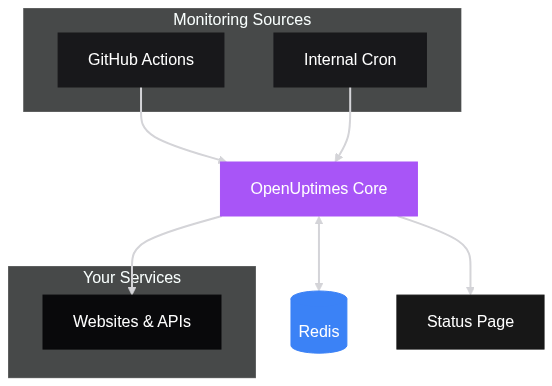
The architecture is designed to be simple and effective:
- Monitoring triggers periodically check your services:
- GitHub Actions works for all deployment types
- Internal Cron System provides more precision for self-hosted deployments
- The ping API checks all services and updates Redis
- The frontend displays status data from Redis
- Admin users can configure services through the admin interface
Who Should Use OpenUptimes?
OpenUptimes is ideal for:
Small to Medium Businesses
- Create a professional status page with minimal effort
- Keep customers informed about service availability
- Build trust through transparency
Development Teams
- Communicate service status to users and stakeholders
- Track historical performance across multiple services
- Integrate uptime monitoring into existing workflows
Independent Developers
- Monitor personal projects and services
- Provide a professional status interface for clients
- Low-maintenance solution that "just works"
Open Source Projects
- Provide transparency about service uptime
- Easy community contribution with familiar technologies
- Free for non-commercial use
Monitoring Options in Detail
OpenUptimes provides multiple ways to monitor your services:
Internal Cron System
Key Features: - Built-in scheduler with precise timing - Down to 1-minute check intervals - Works on traditional hosting (not serverless) - Complete control through admin UI
Best for: - Self-hosted deployments on traditional servers/VPS - Users who need precise timing - Teams that want complete control over monitoring
Limitations: - Not compatible with serverless platforms like Vercel - Requires a persistent runtime environment - Uses resources from your OpenUptimes instance
Learn more about the Internal Cron System
GitHub Actions
Key Features: - Uses GitHub's infrastructure - Minimum 5-minute intervals - Works with all deployment types - Perfect for serverless platforms
Best for: - Deployments on serverless platforms like Vercel - Users who prefer a "set and forget" approach - Teams already familiar with GitHub Actions
Limitations: - Minimum 5-minute intervals - Subject to GitHub's scheduling limitations - Requires a GitHub repository
Learn more about GitHub Actions Monitoring
External Monitoring
Key Features: - Integrate with third-party systems - Custom intervals and locations - Additional monitoring redundancy
Best for: - Global applications needing regional monitoring - Mission-critical services requiring redundant checks - Users with existing monitoring infrastructure
Deployment Options: - Custom cron servers - Cloud-based cron services - Serverless functions - Existing monitoring platforms